

For a law firm, cybersecurity is not just an IT task. It is part of protecting client confidence, keeping legal work moving and giving partners a clear view of who owns the next decision when something does not look right. Malware protection, patching, backups and multi-factor authentication work best as a connected set of controls—not as isolated products purchased after the last scare.
Law practices handle confidential communications, matter records, financial details and personal information across office devices, cloud applications, email and external suppliers. A security incident can therefore become a business-continuity issue quickly: people may need to pause work, assess information exposure, coordinate advisers and respond to client concerns. Recent Australian legal-sector incidents demonstrate why a practical layered approach matters.
Cybersecurity for law firms starts with a clear operating model
A firm does not need to turn every partner or practice manager into a security specialist. It does need a way to make informed decisions about the systems that hold client information, the people who can reach them and the suppliers that support them. The first principle is ownership: someone needs to know which controls are in place, who maintains them, what happens when an alert appears and how the firm will recover from a serious interruption.
That does not mean every system must be run by one provider, or that specialist suppliers should be pushed out. It means the responsibilities around those suppliers should be visible. A firm benefits when its IT partner, security provider, software vendors and internal decision-makers can work from the same current picture of access, changes, escalations and recovery priorities. That is how a firm avoids turning a partner or office manager into the person who has to translate a technical issue between multiple parties.
At vCloud, the practical starting point is to understand the firm’s environment before recommending changes. The existing law-firm IT management approach covers maintained systems, malware protection, firewalls, backups and reviews; this article focuses on how those areas fit together when the goal is a more resilient day-to-day operating model.
Why the impact is wider than one compromised device
When a device, mailbox or user account looks suspicious, the immediate technical task is only one part of the issue. The firm may need to decide whether to isolate a workstation, reset access, contact a software supplier, check whether a matter deadline is affected and determine what information needs to be reviewed. If those decisions are improvised under pressure, the people closest to clients can spend their time trying to find an answer rather than continuing legal work.
This is why a law-firm security plan should be anchored in the firm’s actual priorities. A conveyancing practice, litigation team or commercial practice may rely on a different mix of devices, document systems, court portals and third-party services. The technical controls should still be recognisable—secure identities, maintained endpoints, protected backups and clear escalation—but the order in which they are reviewed should reflect the systems that would interrupt the firm most if they became unavailable.
A useful plan also separates urgent response from longer-term improvement. Staff need a simple way to report a suspicious email, unexpected approval request or lost device. The firm needs an escalation path for a genuine incident. Separately, decision-makers need a routine for reviewing outstanding patching, account changes, backup tests and supplier responsibilities. Keeping those conversations distinct helps a firm respond calmly today while still improving the baseline for tomorrow.
Malware protection is a programme, not a product
A maintained endpoint security product matters, but it cannot carry the whole security plan on its own.
For a law firm, malware protection needs to work as a maintained set of layers. Endpoint protection matters, but it should sit beside supported software, sensible administrative access, safe document handling, clear alert triage and recoverable backups. It also needs named ownership: someone should know what is monitored, who acts on an alert and how the firm continues work if a device has to be isolated. The practical question is not whether one product can remove all risk. It is whether the firm can reduce avoidable exposure, recognise a warning early and respond in an orderly way when something suspicious is found. It should be clear which endpoints are covered, when a failed update is investigated and how a concern travels from the person who spots it to the person who can authorise a response. It should include tested backup steps and a clear escalation path for suspicious attachments, unexpected software or signs of unauthorised access.
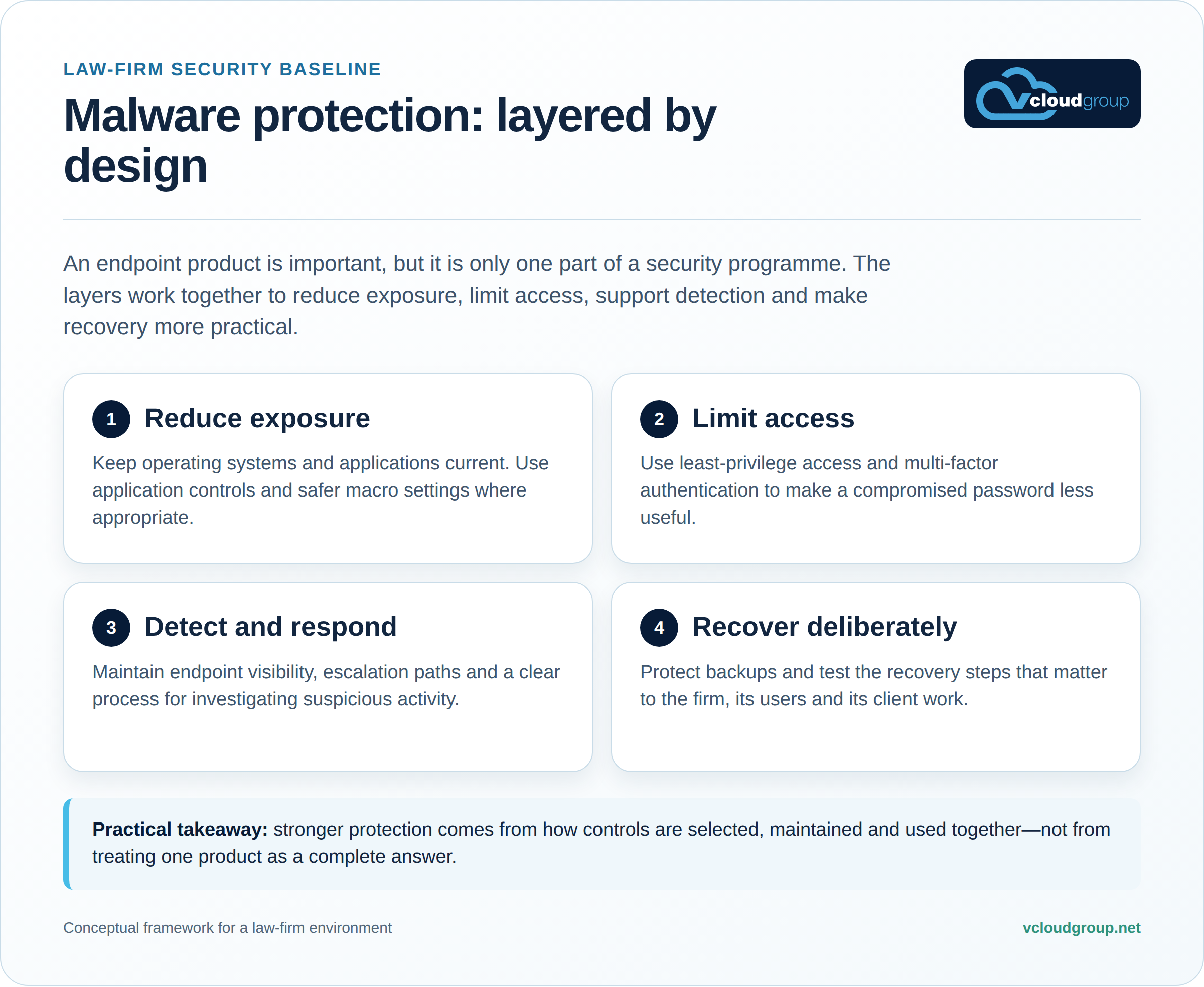
Malware protection is often described as antivirus, but a useful law-firm baseline is broader. It considers how devices are updated, which applications can run, how documents and macros are handled, who has administrative access and how a suspicious event is investigated. The Essential Eight was designed as a complementary set of strategies rather than a menu of unrelated purchases.
That is important because a firm can have endpoint software installed and still face risk from an unpatched application, an exposed administrator account, a deceptive attachment or a recovery process nobody has tested. The goal is to reduce avoidable exposure, improve the chance of early detection and make the next response more orderly.
For a small or medium law firm, that can translate into ordinary but disciplined work: reviewing endpoint coverage, confirming supported operating systems and applications, applying updates through a managed process, limiting local administration, protecting backups and agreeing what staff should do if an email, device or account activity feels wrong. These steps are not glamorous, but they are easier to improve when they are reviewed as one operating model rather than as a collection of disconnected tools.
It is also worth distinguishing prevention from recovery. A firm should want to block suspicious activity where possible, but it should also know how client work can continue if a device must be isolated or a service needs to be restored. That is why the conversation should include access, backups, escalation and business priorities—not just the name of an endpoint product.
Multi-factor authentication reduces the impact of an exposed password
MFA is an additional control for identity and access; it does not replace secure devices, sensible privileges or staff awareness.

Multi-factor authentication gives a firm another check before an account can be used. It is most valuable where an exposed password could affect email, client documents, remote access, practice systems or administrative tools. A planned rollout considers who uses each system, which recovery steps are available when a device is lost and which accounts would create the largest operational consequence if access was misused. It also sets clear rules for approvals, emergency access and administrative changes, so staff have a predictable process rather than improvised exceptions whenever something urgent occurs. For higher-consequence accounts, the firm should know which factor is required, who can reset it and how that exception is recorded and later reviewed. A user who receives an unexpected prompt needs a clear way to report it quickly, without guessing whether it is legitimate.
Passwords can be guessed, reused, entered into a convincing phishing page or obtained through another breach. Multi-factor authentication asks for an additional factor before access is granted, so a password alone is less likely to be enough. Stronger, phishing-resistant approaches provide more protection than passwords or weaker methods, especially for access to sensitive systems and information.
For a law firm, begin with the accounts that create the biggest operational or information-handling consequence: email, cloud document stores, remote access, practice systems, privileged administration and third-party portals. If an attacker obtained this password, what else would they still need before they could do harm?
A good MFA rollout also needs to be usable. If staff do not understand why an approval appears, or if exceptions are improvised informally, the control can create avoidable workarounds. Clear onboarding, defined recovery steps for a lost device, accountable administration and periodic review of privileged accounts help the control remain practical.
MFA should also sit alongside least-privilege access. Not every user needs every system, and not every account needs administrative rights. If an account is compromised, limiting what it can reach can reduce the impact while the firm investigates and responds.
Where Cisco Duo can fit in a law-firm security plan
Cisco Duo is one option a firm can assess when it wants to strengthen identity checks. Its multi-factor authentication offering supports methods including biometric verification, passcodes, hardware tokens and push-based approvals, with options designed for phishing-resistant deployment. The right choice depends on the applications the firm uses, its identity platform, staff working patterns, accessibility needs and the level of administrative effort it can sustain.
The useful discussion is not “Do we buy a product and become secure?” It is “Where are the most important identities, how are they currently protected and what change will make access harder to misuse without disrupting legal work?” Duo may be a practical fit for a firm that needs a managed MFA layer across cloud services, remote access or administrative systems. It should be selected, configured and reviewed as part of a broader plan—not presented as a substitute for patching, backup protection, staff awareness or incident response.
That distinction matters when the firm is comparing providers or products. A security tool can be capable, but it still needs an owner, a deployment plan, an escalation path and a process for checking that it continues to cover the systems it was chosen to protect. Those questions belong in the assessment before a decision is finalised.
Make the controls workable for the people who use them
Security is easier to sustain when it is designed around normal work. A lawyer or legal assistant should know how to recognise a sign-in prompt, what to do when a second-factor device is unavailable and where to report something unusual without worrying that they will be blamed for asking. Administrators should know which accounts are privileged, where emergency access is recorded and when a supplier must be involved. Partners should know who can make a decision when an issue has operational, client and technical consequences.
That is not a call for a large internal security department. It is a call for a small number of documented, repeatable habits: approve access changes deliberately; review accounts that no longer need access; keep software and protections maintained; test the recovery path instead of assuming it will work; and capture the outcome when an incident or near miss reveals a gap. Those habits make an external IT provider more effective because the provider has a clearer environment to support and the firm has a clearer way to validate what has been done.
The same principle applies when the firm brings in a new legal application, changes a cloud service or opens a new office. Treating security and continuity as part of the implementation conversation is usually less disruptive than trying to retrofit controls after staff and client records are already relying on the new service. It also provides a natural point to confirm MFA coverage, access roles, backups, supplier responsibilities and the person accountable for keeping the record current.
What vCloud can review with your firm
A security assessment is a structured conversation about the current environment and the next practical priorities.
A useful security assessment starts by creating a shared view of the current environment. It maps the systems and client-information paths the firm relies on, checks how access is managed, reviews the state of endpoint and patching controls, and asks whether recovery steps are realistic for the way people work. It should also identify who owns a decision when support, specialist applications and cloud services overlap. The first output should be a clear, prioritised picture—not a generic checklist or a product recommendation made before the facts are understood. It shows which actions protect client information first, which work can be scheduled around the firm’s operations and where a provider’s scope or an internal approval needs clarification before a security gap becomes a rushed decision. That shared view also makes it easier to agree a realistic sequence of work, rather than leaving urgent technical and operational choices to chance.
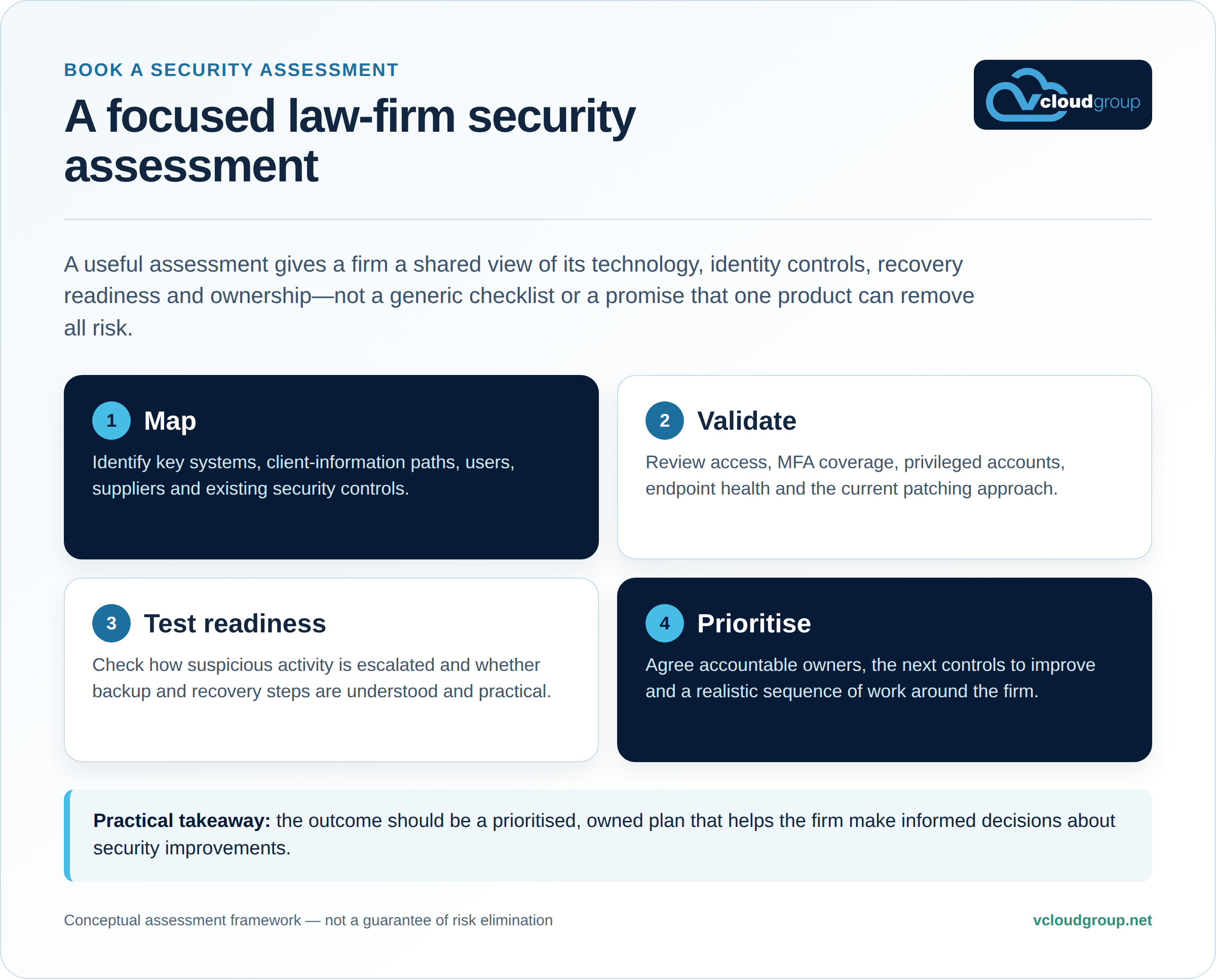
A useful security assessment should establish a shared view before it produces a recommendation. reviewing the current access model, checking the state of endpoint and patching controls, and understanding whether backup and recovery steps are realistic for the way the firm works.
It should also identify ownership. When an issue crosses IT support, a specialist application, a cloud service and the firm’s internal decision-makers, a named coordinator and clear escalation path can save considerable time. The outcome is not a generic checklist; it is a prioritised plan that identifies what to address first, who is responsible and how progress will be reviewed.
The review can incorporate the systems and support arrangements already in place. It is not about forcing every provider out of the picture. It is about making the responsibilities between them visible, confirming that the controls work together and ensuring the firm is not left in the middle of a technical hand-off when timely decisions matter.
vCloud’s managed IT and security services provide the relevant service context. The assessment is the opportunity to discuss the firm’s actual environment and decide whether an improvement should be made now, staged around operations or recorded as a future priority.
Questions partners and practice managers can ask now
- Which systems hold or provide access to client information, and who owns each one?
- Where is MFA already in place, and which higher-consequence accounts still rely on a password alone?
- How are operating systems, applications and endpoint protections monitored and updated?
- Who can approve administrative access, make security changes or respond to an urgent alert?
- Are backups protected separately, and has the firm rehearsed the recovery steps that would matter most?
- When multiple providers are involved, who coordinates the investigation, decisions and client-facing updates?
The answers do not need to be perfect before the firm asks for help. They do, however, give a security discussion a practical starting point. A short list of known systems, current access methods and unresolved concerns will usually make an assessment more productive than a broad request to “make us more secure”.
For more practical technology guidance, visit the vCloud Group knowledge hub.
Book a Security Assessment
If your firm wants a clearer view of malware protection, access controls, recovery readiness and accountability across providers, start with a Strategic IT Review Session. We can discuss the current environment, the relevant risks and a practical next sequence of work.
Book a Security Assessment →