

On 21 October 2026, the PHP project released emergency fixes for two critical vulnerabilities: CVE-2026-109618 and CVE-2026-109619. The releases are PHP 8.5.12, 8.4.27, 8.3.36 and 8.2.35. PHP says the issues can allow unauthenticated remote code execution and strongly encourages users to update immediately.
For an Australian small or medium business, the first challenge is usually not patching a server yourself. It is working out whether PHP is part of your website or portal, whether the hosting provider, web developer or internal team controls it, and how to prove the important parts of the website still work once a change is made. That is where a short, documented conversation can prevent confusion becoming delay.
Before any urgent maintenance begins, ask for one practical response record: the public URL or service affected, the current PHP runtime or vendor package, the host and developer contacts, the person who can approve the change, the proposed maintenance window and the website journeys that will be checked afterwards. That small record gives a business a clear way to follow progress without trying to translate technical messages between suppliers. It also creates a useful starting point if a different technician needs to investigate later.
What is happening with this PHP vulnerability alert?
PHP is a server-side technology used by many websites, content-management systems and web applications. You may never see the word “PHP” in the day-to-day management of your site. You might instead think in terms of WordPress, an online enquiry form, a booking portal, your website host or the agency that built the site. Those are still different layers of the same operating picture.
The PHP security advisory says the current risks apply to PHP installations that serve web requests, including PHP-FPM, Apache with mod_php, php-cgi, FrankenPHP and LiteSpeed. The demonstrated risk is highest for mod_php, but the business-owner task is broader: confirm which PHP runtime serves your public website and whether the responsible provider has verified the relevant fixed release.
The two CVE numbers are useful labels for suppliers, security tools and advisories to discuss the same disclosed issues. They are not a diagnosis of your own website. A vulnerability is a weakness that may be exploitable; it is not, by itself, proof that a particular Australian business has been compromised.
Why your “updated website” may still need a PHP check
A CMS update and a PHP runtime update are not always the same thing. A site can have current-looking pages, a recently updated plug-in or an unchanged WordPress version while the web server, container image or hosting control panel is still supplying the PHP runtime. Conversely, a host may update the runtime while the web developer is responsible for testing site behaviour afterwards.
This is one reason the Australian Cyber Security Centre’s notice is useful for business owners. The alert is aimed at organisations including small and medium businesses and advises them to identify PHP in their environment, follow official PHP guidance, prepare to apply patches and monitor relevant applications. The version accessed on 22 October was advance guidance and did not claim known active exploitation, so it should not be read as proof of an Australian incident.
Older PHP branches need extra care. The PHP project says 8.1 and older no longer receive normal PHP-project updates, although some operating-system and long-term-support vendors may provide backported fixes. That makes a version and vendor confirmation more valuable than a guess based on the age of the website.
Questions to ask today — before anyone starts an urgent change
The person commissioning a fix does not need to become a systems administrator. They do need enough clarity to direct the right supplier and approve the right work. Start with these four questions:
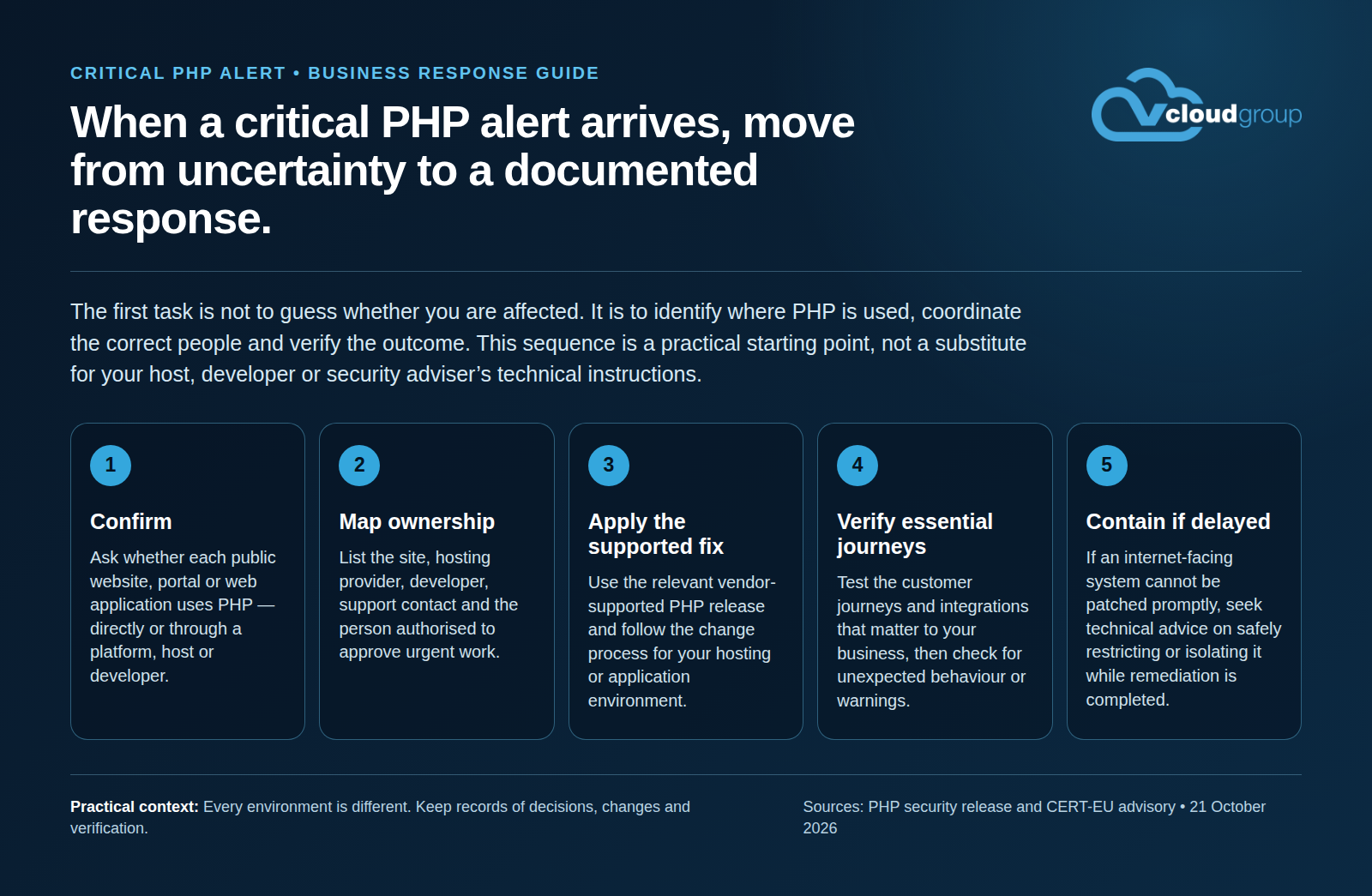
Use the response path to turn the supplier conversation into a controlled request. Start with the public service affected, identify the host, developer and business approver, record the supported fix and agree the journeys to test afterwards.
Use it to confirm: what is exposed, who owns each decision, which supported fix is planned, which customer journeys will be tested and how a delay will be contained.
It gives every participant one practical reference point without asking the business owner to translate technical messages between providers.
It is reasonable to ask for the answer in writing. That does not slow a good provider down; it gives the business a usable record of what changed, who approved it and what was verified. It also stops the owner becoming the middle person between a host saying “the server is done” and a developer saying “the site still needs testing”.
Patch, mitigation and a future website review are different decisions
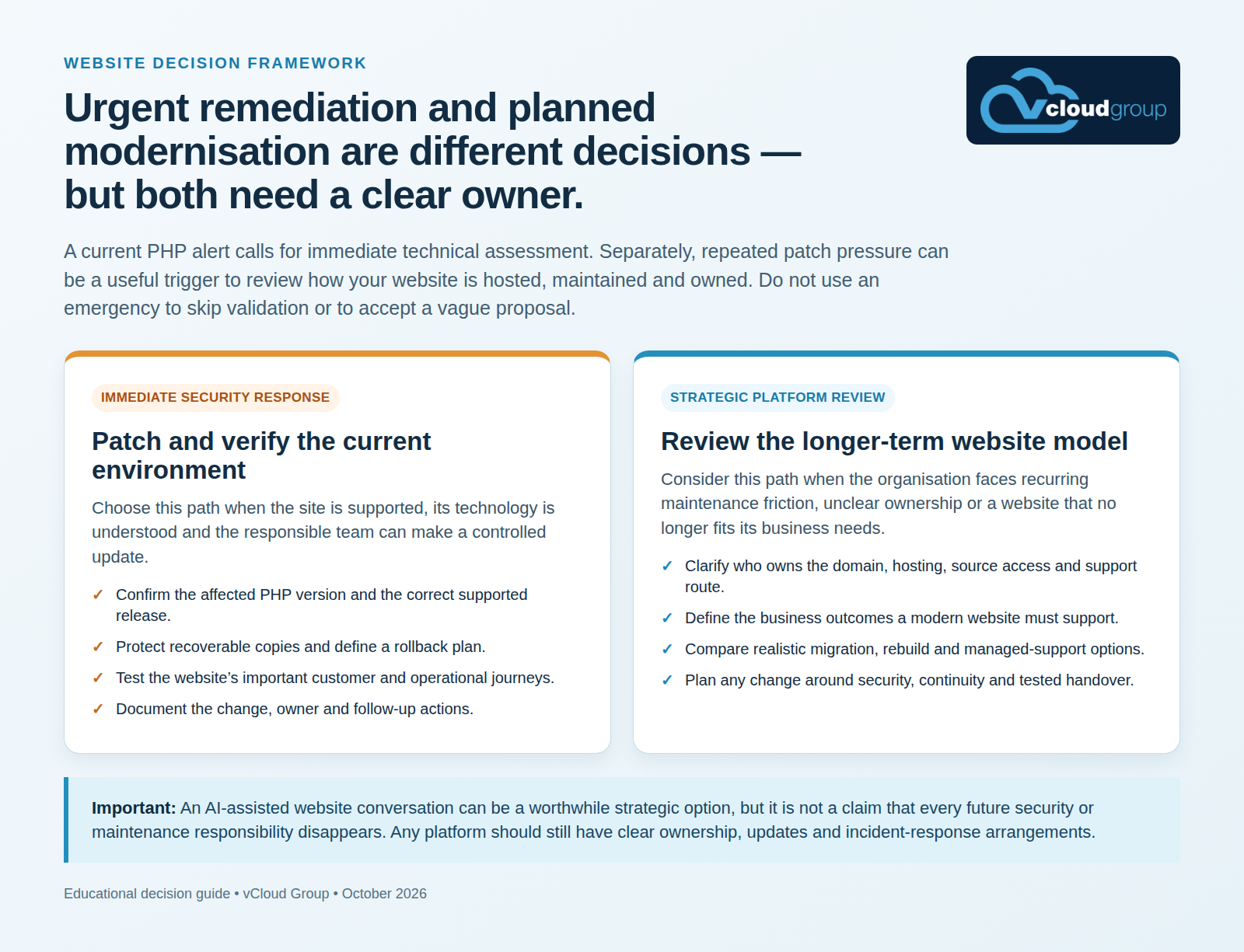
The immediate priority is to establish whether an affected PHP runtime is serving requests and to apply the correct supported fix. The PHP project describes an update as the complete solution.
A temporary configuration change, WAF rule or maintenance window may reduce exposure in a particular environment, but it should not be sold as a universal substitute for the vendor fix.
A future website conversation is a separate planning decision: define the scope, ownership and customer journeys to verify rather than turning an urgent alert into a vague rebuild proposal.
The PHP advisory documents measures that can reduce exposure to specific paths if an update cannot happen immediately, but explicitly says those measures do not make an installation safe.
Practitioners discussing the incident have also raised real questions about package timing, container-image rebuilds and what changes can break uploads or other administrative workflows. Those are prompts for the responsible technical team to check, not instructions for a business owner to implement from a forum thread.
Separately, a recurring security update can be a fair reason to ask whether the website’s long-term model is still right for the business. That is a planning conversation, not an excuse to turn a current security alert into a vague rebuild proposal. A good decision separates the emergency scope from the future-state scope.
Be careful with emergency pricing conversations
When a public security issue is urgent, it is easy for a business to hear two very different messages: “we can update this now” or “it is time to rebuild everything”. Neither response is automatically wrong, but both should be explained in a way the business can evaluate.
Illustrative scenario only — not a market quote
You may be presented with an urgent-update conversation around $1,000, or a rebuild conversation around $4,000–$5,000. Those figures are examples from this brief, not a recommended rate, a prediction of your cost or proof that one option is necessary. Before approving work, request a written scope that names the affected asset, the PHP/runtime work, the testing steps, the rollback or recovery approach, the supplier responsible and any work that remains outside the quote.
A controlled patch can be the right answer when the site is supported, the environment is understood and the responsible team can make and verify the change. A planned redesign or conversion may be worth assessing when ownership is unclear, maintenance is repeatedly reactive or the current site no longer serves the business well. The key is not to use a security alert to skip the evaluation you would normally expect from a significant website decision.
Turn the update into a controlled business record
Security work becomes much easier to manage when the business can see one simple record rather than a long email chain. It does not need to be a technical incident report. A short one-page change record can capture the public URL or service involved, the responsible provider, the relevant PHP version or vendor package, the change window, the approval contact, the rollback contact and the checks that will demonstrate success.
For a typical business website, the after-change checks might include loading the home page, submitting a contact or quote form, checking transactional or confirmation emails, signing in to a customer portal if one exists, checking any payment or booking journey that is in scope, and confirming that the site does not show a visible error. The list should match what the business actually relies on. A one-page brochure site and an online portal have different critical journeys.
Ask the provider to state what they tested, what they did not test and what needs monitoring afterwards. That avoids a common misunderstanding: “the server update completed” is a technical milestone, while “the business website is operating as expected” is a separate business outcome. Both are worth recording. If a fault appears later, the record gives the next technician a starting point instead of forcing the business to reconstruct what changed.
This is also the right moment to confirm access. The business should know where its domain registration, hosting account, website source access, DNS settings and support contacts sit. Access does not mean every owner needs to make technical changes; it means the business is not dependent on finding the right person only when an urgent issue arises.
What if no one can give you a clear answer?
It is common for a website to have more than one supplier. A marketing agency may manage content, a developer may manage the code, a host may control the server and an internal staff member may hold the domain or registrar account. That arrangement can work, but a critical advisory exposes whether there is a clear person coordinating the full response.
If answers are unclear, do not simply forward the alert to everyone and wait. Nominate one business contact to collect the asset list, ask the host whether the running PHP package is fixed, ask the developer what application-level testing is required, and agree who has the authority to approve the change. The objective is not to push a supplier out; it is to stop the business owner from hand-balling questions between providers without a single accountable view.
Where a provider needs time to check an internet-facing service, ask what exposure-reduction or isolation decision is being considered, what it may affect and how it will be reversed once the supported update is verified. CERT-EU advises prompt patching and says internet-facing applications should be isolated when a patch cannot be applied immediately. The correct operational choice still depends on the system, its users and the responsible technical team.
Where vCloud Group and AI by Design can fit
vCloud Group can help start the business conversation: identify the decision owners, bring the host and developer into the same discussion, define the customer journeys that must be checked, and make sure the response is not handed from supplier to supplier without accountability. The outcome should be a clear, documented next step — not a generic reassurance.
If the business decides that a longer-term website change is justified, vCloud Group’s partner AI by Design can be part of a separate AI-assisted website or landing-page conversion conversation. That may include retaining the familiar look and useful content while reviewing the platform approach. It should not be described as a promise that every future security, hosting or maintenance responsibility disappears; clear ownership and an incident-response process still matter.
For now, the sensible first step is simpler: establish whether PHP is present, obtain a verified answer about the runtime and patch status, and agree how the site will be checked after the change. Doing that before the website is compromised or taken offline under pressure gives the business more control over the next decision.
For further practical business-technology guidance, return to the vCloud Group Knowledge Hub.