
Modern Australian workplaces have transformed rapidly over recent years. Where office employees once worked exclusively from a single desktop computer permanently wired to a network port, today’s professionals rely on multiple mobile tools. A typical business director, practice manager, consultant, or operations coordinator arrives at the office with a lightweight laptop, docks to external monitors, answers client calls on a corporate smartphone, authenticates multi-factor identity prompts, and reviews documents on a tablet during travel.
Yet despite this shift toward flexible working, many managed service providers continue to bill for IT support using a legacy model: per-device pricing. Under a per-device agreement, the provider charges an independent recurring support fee for every individual piece of hardware. When an organisation provides an employee with a laptop for remote work alongside their office desktop, their IT support fee doubles. Adding a smartphone or tablet triggers further charges. Before long, a small business of twenty people finds itself paying monthly support retainers on fifty or sixty distinct endpoints.
This pricing structure imposes an unnecessary multi-device penalty. It penalises businesses for modernising and ignores a basic commercial reality: an employee can only actively use one device at any single moment. Paying multiple support fees for idle hardware sitting in a bag makes no commercial sense.
At vCloud Group, our approach to managed IT and cloud services is built around people rather than hardware counts. Our managed services agreements follow a transparent, per-user pricing model that includes up to five eligible work devices per user under a single monthly fee. Whether working at an office desk, travelling with a laptop, or checking email on a phone, your team remains fully supported without unexpected surcharge loops.
The Flawed Economics of Per-Device IT Support
To understand why per-device contracts create friction for Australian businesses, one must examine their origins. In the era of on-premises servers and local networks, IT maintenance was physically tied to hardware. Technicians travelled on-site to repair mechanical drives, replace components, and configure local cables. Pricing support per physical box was a logical way to allocate labour when hardware required manual intervention.
In modern cloud environments, however, IT support is predominantly identity-driven. The vast majority of help desk requests involve user identity, Microsoft 365 access, mailbox permissions, cloud synchronisation, and security credentials. An employee requiring assistance with multi-factor authentication or an application error needs support regardless of which screen they are using. When a provider bills separately for every device, the business pays multiple times for the exact same underlying user support.

The administrative burden of per-device billing is equally frustrating. Managing directors and practice leaders must constantly track hardware asset registers. Every time a new team member joins, a spare laptop is purchased for field travel, or an older machine is retained for temporary use, management must negotiate whether that device should be billed or paused. If an employee keeps an older desktop in a consulting room for occasional reference, the business is billed month after month for equipment used only a few hours weekly.
Furthermore, per-device billing penalises companies during staffing transitions. When team members change, reconciling hardware inventories often leads to dispute loops where retired endpoints continue generating invoices long after being stored away. Workplace surveys across Australian organisations confirm that managing remote hardware, connectivity, and multi-device costs across hybrid teams remains a leading administrative challenge for business owners.
Per-User vs Per-Device: Comparing IT Cost Structures
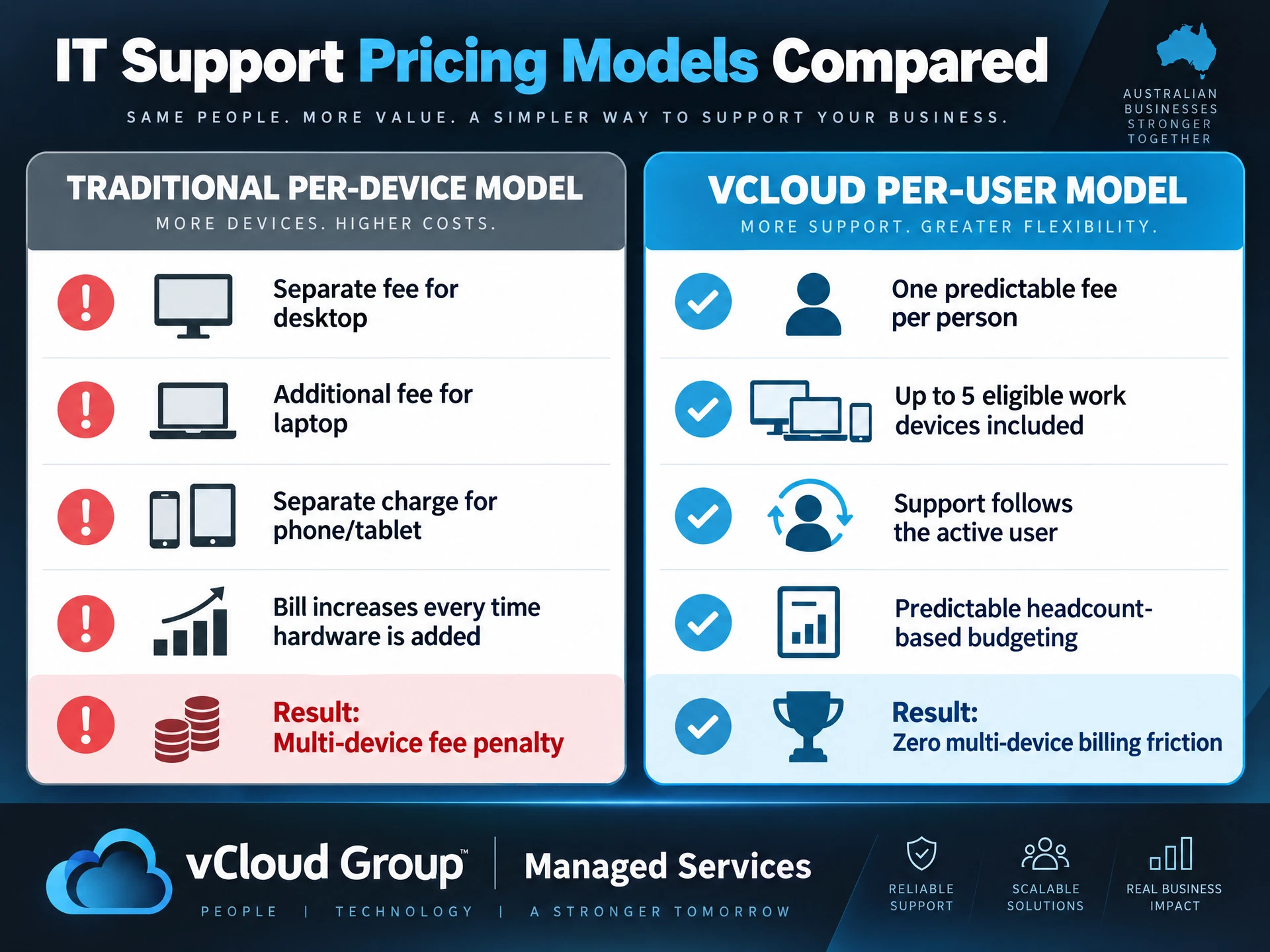
When comparing managed IT proposals, understanding the financial architecture of each model is essential. A per-device agreement prices each physical endpoint independently. A provider may quote what seems like a modest fee per computer. However, once you tally office desktops, travel laptops, mobile phones requiring security management, and tablets, the monthly expenditure multiplies rapidly across the organisation.
By contrast, true per-user managed services tie costs directly to headcount. The business pays one predictable monthly rate for each authorised team member. That rate covers the complete set of digital tools the employee uses. Rather than counting screens and keyboards, leadership calculates their monthly IT budget simply by multiplying the per-user fee by their staff headcount.
This headcount model matches modern software licensing. Cloud platforms like Microsoft 365 license users rather than hardware, allowing each person to access applications across multiple devices. Per-user managed services apply that same logic to support and maintenance, ensuring your IT investment scales directly with business capacity rather than hardware sprawl.
Financial analysts note that headcount-based budgeting substantially improves cash flow forecasting. When planning growth or opening a new location, leadership knows the exact IT cost per new hire without guessing how many endpoints each role requires.
Importantly, per-user pricing prevents the risky practice of staff using unmanaged personal devices. When per-device fees apply, businesses often avoid adding mobile phones or home computers to corporate management to save costs. This introduces significant security vulnerabilities. A per-user agreement covering up to five devices ensures every endpoint accessing corporate data is fully secured, patched, and monitored.
Why Supporting Up to Five Devices Makes Commercial Sense
Business owners often ask how vCloud Group can include up to five devices per user without charging separate fees for each screen. The explanation rests on modern automation, proactive monitoring, and a realistic view of how people work. Because employees only interact with one primary device at a time, active service desk assistance is focused on the task at hand rather than spreading simultaneously across multiple screens.
Meanwhile, modern remote monitoring tools handle background maintenance automatically. Tasks like installing operating system updates, updating browsers, and monitoring security health occur silently without requiring individual engineer time for every machine. This automation allows our team to manage multi-device environments efficiently while delivering superior support.
In a standard Australian professional firm, the five-device allowance supports the complete workflow of a modern knowledge worker:
- Primary Office Workstation: The dedicated desktop or docking setup at the office, configured for daily high-volume productivity and core practice software.
- Corporate Laptop: The portable machine used for hybrid work, off-site client meetings, and travel, continuously synchronised with cloud files.
- Smartphone: The mobile device used for calls, corporate messaging, email, and essential multi-factor authentication (MFA) prompts.
- Executive Tablet: A touch-enabled device for reading documents, reviewing contracts, taking meeting notes, or signing forms.
- Home Office Terminal: A secondary computer at a home workspace, secured with corporate zero-trust access and managed antivirus controls.
Covering all five devices under one agreement creates operational resilience. If an employee’s primary laptop experiences a hardware issue before a critical client presentation, they can transition immediately to their office desktop or tablet and continue working while our engineers resolve the issue, without contract disputes.
Practical Device Eligibility and Fair-Use Guidelines
To ensure service quality, a transparent per-user agreement must establish clear eligibility guidelines. A multi-device allowance is designed to cover an individual’s professional tools, not unrelated personal equipment. At vCloud Group, eligibility is guided by three principles: corporate ownership or management, designated user assignment, and supported operating systems.
Every enrolled device must be a business tool used directly by the licensed employee to perform their work. The five-device quota belongs to that named individual; it cannot be pooled or shared across multiple non-licensed staff members, part-time contractors, or administrative teams.
Each device must also run an operating system supported by modern security updates, such as Windows 11 Pro, macOS Sonoma or Sequoia, iOS, or enterprise Android. Outdated operating systems that no longer receive manufacturer security patches cannot be reliably protected and are excluded from managed support.
Modern mobile device management provides vital data segregation on enrolled smartphones and tablets. With corporate email, client records, and proprietary documents frequently accessed on mobile hardware, our service desk implements automated security profiles that enforce biometric screen locks, encrypted local storage, and remote wipe capabilities. Crucially, these controls separate corporate application data from personal photos and messages, respecting employee privacy while ensuring that confidential business information can be instantly erased if a smartphone is lost or stolen on public transit.
Furthermore, individual user devices are distinct from shared company infrastructure. The five-device allowance applies strictly to personal productivity endpoints. Central infrastructure that supports the entire organisation—such as physical servers, hypervisors, firewalls, network switches, and storage arrays—is maintained under dedicated infrastructure schedules with continuous monitoring and rapid response SLAs.
Dedicated shared devices, such as reception sign-in tablets or conference room systems used by multiple staff, are accommodated under separate shared-device profiles, ensuring businesses never pay full personal user rates for communal hardware.
Eliminating Vendor Dispute Loops with Single Accountability
A per-user agreement provides maximum value when combined with single-provider accountability. For years, Australian businesses have struggled with vendor hand-balling. In a fragmented technology environment, internet access comes from one carrier, phone systems from another vendor, cloud hosting from a third party, and local help desk from an external contractor.
When an issue occurs—such as dropped calls or slow cloud software—this fragmented model quickly turns into finger-pointing. The IT contractor blames the telecommunications provider. The internet carrier blames the router. The router supplier blames the cloud host. Meanwhile, the business owner and their team waste billable hours trapped in the middle.
vCloud Group was built on a policy of zero hand-balling. We do not resell third-party commodity connections or deflect technical responsibility. Our Australian engineering team directly manages the entire technology environment supporting your organisation—from our sovereign Australian data centres and high-speed private cloud networks to business communications and individual laptops.
Proactive systems monitoring further transforms the client experience. Rather than waiting for a catastrophic outage to interrupt billable operations, our network operations centre continuously tracks telemetry from enrolled workstations, cloud instances, and connectivity circuits. Automated threshold alerts notify our engineering team of degrading disk health, thermal throttling, unexpected authentication spikes, or network packet loss before end users notice performance degradation. This preventative posture allows our engineers to replace failing components or reconfigure routing during planned maintenance windows, ensuring uninterrupted business productivity.
When staff contact our Melbourne service desk, they reach experienced Australian engineers who have complete visibility across your network, cloud systems, and devices. If an application issue arises, our engineers investigate the endpoint, cloud server, and network routing within a single integrated workflow. One accountable partner manages your technology for a predictable fee.
What to Ask Before Signing Your Next Managed Services Agreement
Evaluating IT proposals requires asking the right questions to uncover hidden costs. Before committing to a managed services agreement or renewing an existing contract, executive leadership should ask prospective providers these six questions:
- Is support billed per device or per user? If billing is per device, request a clear simulation of monthly costs when employees use a laptop, desktop, and smartphone.
- How many devices are included per user before extra fees apply? Clarify whether mobile phones, tablets, and secondary computers are included in the base rate or incur separate maintenance fees.
- Are mobile devices secured under corporate policy? Ask whether mobile device management, automated encryption, remote wipe, and multi-factor authentication are included for company smartphones.
- How are onboarding and hardware upgrades handled? Verify whether the provider charges large fees each time an employee joins or upgrades their laptop, or if routine onboarding is included.
- Does the agreement include proactive cybersecurity? Confirm that endpoint detection, managed antivirus, and software patching aligned with the Essential Eight framework are part of the core service.
- Who is accountable when multi-system issues arise? Establish whether the provider manages the underlying cloud infrastructure and connectivity or if your team must coordinate disputes between separate suppliers.
Workplace data confirms that organisations operating under transparent, flexible IT agreements achieve higher staff technology satisfaction and lower administrative overhead. Demanding clarity around per-user inclusions ensures your budget supports business productivity rather than administrative complexity.
Key Takeaways for Per-User IT Management
- Headcount-Aligned Budgeting: Monthly IT support expenditure scales directly with team size, providing predictable forecasting without surprise hardware fee spikes.
- Up to Five Devices Included: Laptops, desktops, smartphones, and tablets are covered under one user rate, eliminating multi-device billing penalties.
- Active-Usage Alignment: Modern support recognises that professionals use one device at a time, removing redundant fees for idle hardware.
- Zero Hand-Balling Accountability: A dedicated Australian engineering team manages endpoints, cloud platforms, and networks without vendor dispute loops.